
So the good news is Apple have announced the successor to the Lion, OS X 10.8 Mountain Lion, ships this Summer has a heap of new features, most of them coming from the iPad and the iPhone, there were times the features of the Computers and Macs were put in a Smartphone, it’s the reverse that is happening now.

Features of OS X 10.8 Mountain Lion include
- Better iCloud Support
More accessibility, better support, keep your mails, Calendars and Contacts sync across your iOS and OS X devices. - Messages
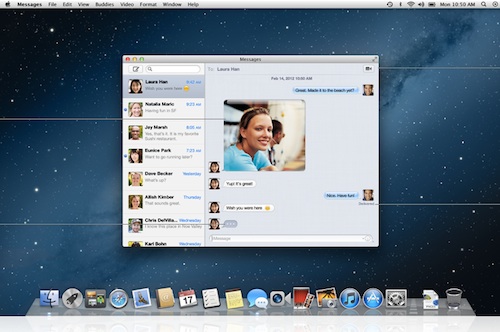 One of the newest features for OS X Mountain Lion, Messages, it is iMessage on the iPad/iPhone + iChat on the OS X + FaceTime bundled into one. Now you can send messages across Apple devices from a Single point of contact.
Oh and you can download it right away on your OS X Lion, here is the Beta version for Messages on Mountain Lion. - Notification Center
 iPhone has it, the iPad has it, now it is the time for the OS X to have it, yes people, the notification center is here for the Mac, with access to alerts from Mail, Calendar, Messages, Reminders, and more.Swipe to the left, and you’ll see all your notifications in a simple, ordered list. So you’ll always know what’s up as soon as it comes up.
 - Better Notes and Reminder
Notes and reminder should be synced with your phone and the computer and this is exactly what is accomplished in the OS X Mountain Lion, everything Synced to iCloud and accessible everywhere. - Twitter Integration
First it came on the iPad and the iPhone in iOS5, it’s here now on OS X mountain Lion, a ful fledged twitter integration, Tweet links and photos directly from Safari, iPhoto, or Photo Booth with the new Tweet Sheet. - Airplay Mirroring
Get your Mac from your Screen to a HDTV, with AirPlay Mirroring, you can stream what’s on your Mac to your HDTV. - Gatekeeper
 We know Apple takes security seriously, Gatekeeper in OS X Mountain Lion makes the Mac safer than ever. It helps prevent you from unknowingly downloading and installing malicious software. And it gives you control over which applications to download and run on your Mac. Now you can choose from three security options. You can download and run applications from anywhere, just as in OS X Lion. To be even safer, download and run apps from the Mac App Store and apps with a Developer ID. Or download and run only apps from the Mac App Store — the safest setting of all. Gatekeeper lets you decide which setting is best for you.
oh and one more thing, you can download the developers preview right away from the Apple Website, the people who are lazy enough to search can click here
Via: Apple