
Facebook now has more than 800 million members and people have learnt several ways to earn money out of this potential, both Good and Bad, Facebook advertising is quite a hit as well, but Black Hat or unethical marketers are using innovating ways to get traffic to their website.

What they do is, post a spam link which of-course is lucrative, on your wall which contains a CPA (Cost per Action) or some other form of monetization, once you click on it, it asks for your Facebook permission, which you unknowingly allow, by clicking on Allow and Voila! that update is posted on your wall and all of your friends wall saying it has come from you, some of your friends might do the same and it go on and on and gets viral.
Technically, the target for these marketeers is the whole of Facebook, due to the 6 degree Separation Phenomena (we are writing an article soon about it), it will definitely reach each and every person on Facebook.
Thanks to Facebook, they have some real tools (eg. report Abuse) and great algorithm to detect and curb the spam, however it takes time to have it completely removed BUT you can do your part and follow these really simple steps and STOP it by yourself.
We are today going to tell you simple ways you can Stop Facebook Spam, The precautions you should  take, how to prevent if you are affected.

Firstly, a little about how these Spam Link look


or something related to, You could win a Free t-shirt or Shoes
Once you Click on the link go to their website, You are in the Trap already
Prevention of Facebook Spam
1. Go ahead and delete the link from your wall and all the links that your friend have posted on your wall related to the Spam
2. Enable Secure Browsing to Facebook (Facebook: Account Settings > Account Security > check “Secure Browsing (https)” >> Save.)
3. Change Facebook Password
4. Clear Browser Cache
5. Restart your browser
Advance Steps to Curb Facebook Spam
If you see an out-break of spam on Facebook or you have people posting spam links on your wall, you could go ahead and disable the authority to post on your Wall, here is how to do it
1. Go to Privacy Setting from the Top right menu on Facebook

2. Click on Edit Settings on the “How You Connect” label
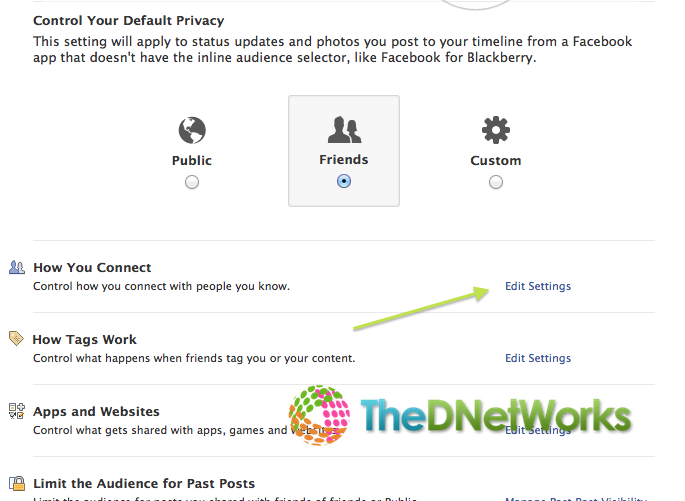
3. Do you see the Who can post on your timeline? change the option to Only Me

Optionally, Once you feel that the spamming links have stopped, you can have change the option back to Friends if you want to have your friends post on your wall.
And you my friend, have successfully averted more than 75% of the Spams and trolling on Facebook. Congratulations
Some more things to be noted.
NEVER, under any circumstances, share you secret email that Facebook give, to allow you to post an update via email, this is a secret email that is assigned to you so that you can post updates to your wall by simply sending an Email to that particular address, you can find that email at https://www.facebook.com/mobile
Remember Facebook is almost as good as your online identity, follow these simple steps and be safeguarded
The DNetWorks Team