
A clock widget can add style to your home screen but it has to fit perfectly with the look you’re trying to achieve. Minimalist, artsy, futuristic, or practical, we’ve got you covered with these eight most stunning clock widgets for Android.
Clockr

Clockr is a simplistic clock widget that displays time in text format. It allows you to customise a few things including font color, font size, clock style, and text alignment. You can apply a semi-transparent background, use alternating text colors, change the letter case (uppercase, lowercase, or both), and force a 12-hour time format. There’s also the option to assign a shortcut when tapping the widget.
Panda Clock No.1
 Panda Clock displays more than just time in a familiar, minimalist manner. It also shows the date and day of the week. There are only two styles to choose from black and white. The widget acts as a shortcut for switching themes as well as the alarm clock.
Panda Clock No.2 Cute

It’s basically the same as Panda Clock No1 except it has a different and rather cute font. Â Still, you are limited to black and white versions. When you tap the widget, you can quickly switch themes and set an alarm.
Beautiful Widgets

Beautiful Widgets is an all-around widget app with a total of 6 clock widgets. SuperClock widgets display other important information such weather, temperature, and battery percentage. The Text Clock Widget only shows time. Beautiful Widgets is fully customisable and gives you free access to clock, weather, and battery skins via the app.
SiMi Clock Widget

SiMi is a simple clock widget that shows the date by default. You have 4 clock widget sizes to choose from and options to show the weather and battery level are available. Font sizes and colors for the time, date, divider, and AM/PM indicator can be adjusted to your liking. Unfortunately, you can’t choose a different background let alone change its transparency.
Animated Weather Widget, Clock

It’s a free alternative to Beautiful Widgets with a few downloadable skins at Google Play. Switching clock skins is incredibly easy too. By default, the widget shows the clock, weather, and date. You can opt to show today’s weather, current weather, or the forecast for tomorrow or the next two days.
Clicking on the weather icon will show an animated weather forecast with customisable backgrounds. Meanwhile, the time is a shortcut to the alarm clock or any app you like. The shortcut can only be changed during the setup phase.
Animated Analog Clock Widget

The widget features an animated clock with a moving second hand. To change its look, you can download free skin packs from Google Play via the app. If you’re having performance issues, you can disable the second hand during setup.
Make your Clock Widget
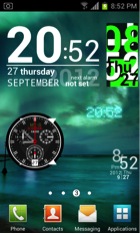
Make Your Clock Widget shows the time, date, and day of the week depending on your chosen skin. There are literally hundreds to choose from and they can be accessed through the app. You can choose from 8 widget sizes. Available skins are tailor-made for every size.
Article by Guest Author: Judene Macariola
This is a guest post by Judene Macariola is a consultant at Broadband Expert, a company that helps home owners and businesses find internet companies which suit their needs. During his spare time, he writes articles related to Android, iOS, and other mobile platforms.Â