
This is a great piece of tool if you use Wi-Fi more often, be it at office or at home, this Android Application allows you to create profiles/schedules to enable and disable Wi-Fi depending upon the Day of the week and time of the day.

This is the age where smartphone does a lot of things than its basic function of making and receiving calls, right from playing games to accessing internet and watching 1080p video, listen to music, you have a all in one device to do just about anything.
With so functions it performs it tends to drain the battery with almost a lot of hours of the day remaining, these devices aren’t really the best when it comes to lasting long on a full charge. We strive very hard to conserve as much battery as possible but most of the times fail.
Welcome, WiFi Timer, this nifty little app, disables the Wi-Fi when not in use, conserving a lot of battery power. You can add multiple schedules, select multiple days, select when to switch on or switch off Wifi and it will all work seamlessly, without any problem! The UI is simple to use and pleasing to the eye.

When you launch the app a WiFi Schedule menu appears where you can see and set all the schedules. You need to go ahead and tap Add Schedule at the bottom and enter some text. Inside the Add Schedule menu, you have options to enter a name, select days of the week and the time of the day.
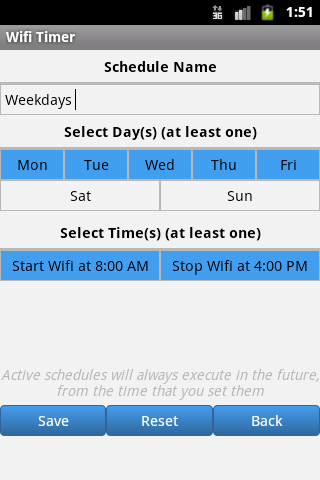

The “time of the day” option comes with two parts: time at which Wi-Fi starts and when it stops. You are required to choose at least one option.
Here’s a list of upcoming features of this app:
– Support for landscape screen orientation
– A beautiful Wifi toggle widget
– Support for international languages (German, Dutch, Brazilian Portuguese and many more)
Try it out. It is simple, ad free and free to use! Wi-Fi Timer Link Google Play Store