
You try to add images to your post and all of a sudden you get an IO Error, and you think what the hell is wrong, everything was perfectly. Now you google search and come to this page in the quest to solve the problem, the good news is, You problem will solve before you close this page, read on

There are several ways you can resolve the IO Error while uploading the images
1. Clear Cache
First, log out of wordpress, clear your browser cache and cookies, restart your browser and then try again. If that does not do it, restart your internet modem. If that doesn’t work, have you tried a different browser to see if that works?
2. Adobe Flash Player ActiveXÂ
- From your Desktop, click Start -> Run and type appwiz.cpl and press Enter
- From the Add or Remove Programs list, select Adobe Flash Player ActiveX and click Remove
- Now simply download and re-install the Flash Player again
3. Change a Setting
The /uploads folder in /wp-content needs more relaxed permissions than the rest of your site generally in order to allow the WordPress software to place images in there.
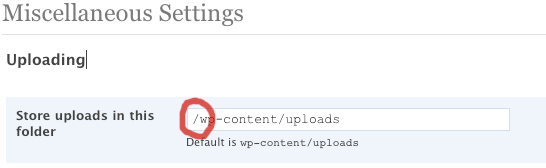
Store path error may occur sometime, Goto Setting in the sidebar in the admin panel of WordPress, Go to media setting sometimes you may see a leading / there, which may be causing the wordpress to throw IO Error, get rid of it, it should be wp-content/uploads
VOILA!
Let us know if these tricks helped you guys.
The DNetWorks Team